Design, Development & Branding
Webflow vs WordPress vs Shopify: Choosing a Platform for Your Australian Business
5 October 2026

The best website platform for small business Australia depends on what your website needs to do, who will maintain it and how your business expects to grow. Start with Shopify for a retail-led shortlist, WordPress for flexible publishing, Webflow for visually controlled marketing sites, and a custom build when specific requirements justify developer involvement.
The problem is that platform demonstrations usually show the finished website, while your team has to live with the editing, subscriptions, maintenance and limitations. A good-looking homepage tells you little about how easily someone can update a service page or fix an incorrect delivery charge.
In our web design and development process, platform selection should follow those practical requirements. This comparison explains the trade-offs and gives you a way to assess them before committing.
1. Best website platform for small business Australia: start with the job
The right platform supports your main customer journey and the work your team does behind it. Decide what those activities are before comparing templates or monthly subscriptions.
Identify the website’s main purpose
Your website’s primary purpose should guide the shortlist, even when it serves several audiences.
An accounting practice might need service explanations, staff profiles and enquiry forms. A homewares retailer needs product information, stock management and a workable purchase process. A training provider might need course descriptions and a booking workflow whose suitability must be checked separately.
Write one sentence describing the main task: “Customers need to compare our services and request a consultation.” Then list the supporting tasks, such as downloading a guide or finding office details.
This gives you something concrete to test in a demonstration.
Compare responsibility as well as features
Platform choice determines how technical responsibilities are shared between your business, your provider and the platform company.
Hosted platforms bundle parts of the underlying infrastructure into their service. Self-hosted software and custom builds require separate decisions about hosting, updates and support, even when an agency manages those decisions for you.
Use this table as a starting shortlist, rather than a universal ranking:
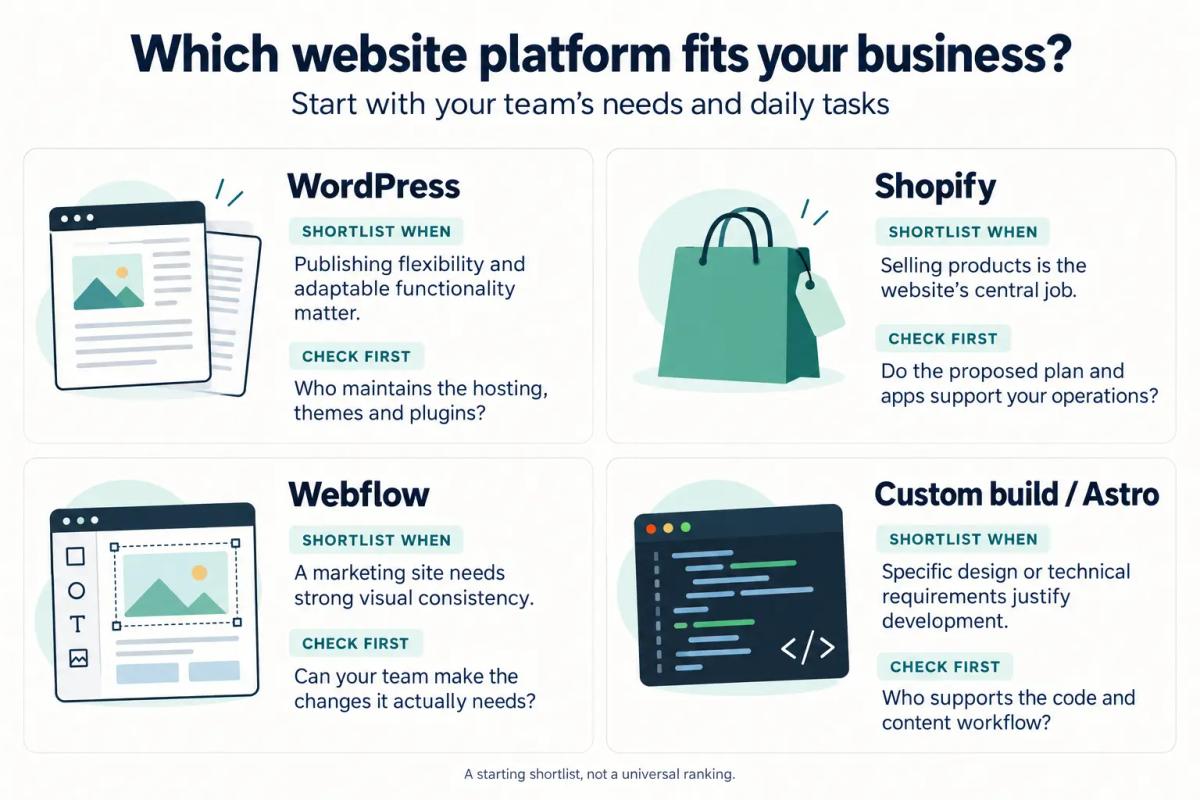
These are practical selection guidelines. The quality of the proposed implementation still matters.
2. WordPress: flexibility with an ongoing maintenance commitment
WordPress is worth considering when your business needs flexible content publishing and control over how the website is extended.
Here, WordPress means the self-hosted, open-source software. A proposal using a managed hosting service should still explain which responsibilities that service covers.
Strengths: publishing and adaptable content
WordPress supports pages, posts, publishing tools, themes and plugins, with options for developers to create custom content types. That makes it a useful candidate for websites with different kinds of information to organise. WordPress.org English (UK)
For example, a business advisory firm could structure services, team profiles and articles separately. The useful question is whether staff can maintain those sections consistently without rebuilding layouts each time.
Ask the supplier to demonstrate your proposed editing experience. The interface you receive depends on the theme, editor configuration and additional tools chosen for the project.
Trade-offs: someone must own maintenance
WordPress requires an ongoing maintenance arrangement covering updates, backups and checks after changes.
Official guidance recommends keeping themes and plugins updated and maintaining backups. Plugin compatibility also needs attention when software versions change. WordPress.org
A maintenance agreement should answer:
- Who applies updates and checks the result?
- How are backups restored if something breaks?
- Who investigates failed forms or publishing errors?
- Which licences renew separately?
- What work falls outside the support fee?
Managed hosting can cover part of this work, but read the actual scope.
Who it suits and how to assess cost
WordPress suits businesses that value publishing flexibility and have a credible plan for technical support.
The core software is available without a software licence fee, but a finished business website still involves design, hosting, configuration and ongoing work. Premium tools and support may add further costs.
Compare those commitments alongside what drives website cost, rather than treating the software price as the project budget. Ask for a complete ownership estimate over a defined period, including likely content changes and renewals.
3. Shopify: a commerce-focused starting point
Shopify deserves an early place on the shortlist when customers mainly visit your website to buy products.
For a retail business, the platform decision should begin with the catalogue, checkout and order workflow. Visual design matters, but daily store operations deserve equal attention.
Strengths: product management and hosted infrastructure
Shopify provides product catalogue tools, including descriptions, images, variants and inventory information, while its platform plans include web hosting. Products
For an Australian stationery retailer, a useful demonstration would involve adding a notebook with different sizes, updating product information and completing a test purchase. That tells the owner more than scrolling through a polished theme.
Use your real product structure in the demonstration. Include a difficult item, such as a bundle or a product with unusual delivery requirements, rather than testing only the simplest sale.
Trade-offs: assess the complete operating cost
Shopify’s subscription is one part of the cost, alongside payment processing, any applicable third-party transaction fees, paid apps and implementation work. The applicable charges depend on the plan, payment arrangements and services selected. Shopify Australia
Ask the supplier to distinguish between:
- Features included in the proposed plan.
- Features requiring a paid app.
- Features requiring custom development.
- Requirements that remain unconfirmed.
For Australian operations, test postcode-based delivery scenarios, regional destinations, refunds and the proposed tax settings. Have the appropriate business adviser confirm tax treatment rather than assuming the platform’s initial configuration is correct.
Who it suits: businesses organised around selling
Shopify is a sensible candidate when product sales and store administration are central to the business.
When comparing WordPress vs Shopify, ask which proposed setup makes everyday operations more manageable. If the WordPress proposal includes a separate commerce system, assess that complete setup against Shopify, including its maintenance responsibilities.
For a consultancy that only needs enquiries, a commerce-led platform may offer capabilities it rarely uses. For a retailer processing orders daily, those same capabilities may be central to the decision.
4. Webflow: visual control for marketing websites
Webflow is worth considering when a business wants a carefully designed marketing website and a defined content-editing workflow.
The key distinction is between updating content and changing the design. Your team may need the first every week and the second only occasionally.
Strengths: structured editing within a designed site
Webflow’s content editor role can update permitted text, media and CMS content without changing the underlying design. Publishing access and editing permissions can be controlled. Webflow Help Center
That arrangement could suit a recruitment consultancy publishing vacancies, team profiles and business updates within established templates. The project should define which content belongs in repeatable collections and which pages require individual layouts.
If you are evaluating a Webflow agency Australia businesses can work with, ask for a practical handover demonstration. Have your intended editor change an image, update a profile and publish a draft.
Trade-offs: permissions, plan limits and portability
Webflow needs careful scoping around plan allowances, team access and what happens if you later move away.
Check the current Site and Workspace arrangements against the proposed CMS structure, traffic needs and editing roles. Avoid relying on an old plan comparison when approving a new proposal. Webflow
Code export also needs qualification: an exported Webflow site does not include a functioning copy of its hosted CMS or all platform-dependent features. Moving elsewhere can therefore require replacement systems and development work. Webflow Help Center
Who it suits: teams with clear editing boundaries
Webflow can suit businesses whose routine changes fit a planned content structure and whose larger design changes can involve a specialist.
Before choosing it, test the difference between updating an existing page and creating a new campaign layout. A team that frequently needs unfamiliar page structures should understand who builds them and what that costs.
Evaluate any shop, booking or account functionality separately. A strong marketing-site demonstration does not establish that every operational requirement has been solved.
5. Custom-built and Astro sites: when development is justified
A custom website makes sense when a specific requirement warrants the additional development and support responsibility.
“Custom” can describe anything from a tailored front end to a bespoke application. Ask the supplier to explain exactly what is being built and which existing services it depends on.
Understand what Astro provides
Astro is a developer-focused web framework for content-driven websites, rather than a complete hosted business administration system.
Its architecture supports delivering content with little client-side JavaScript by default, adding interactive functionality where required. It also supports structured content collections. These capabilities provide a technical foundation; they do not guarantee a fast finished website or better search results. Docs
A content-heavy consultancy website could be a candidate. A project involving a specialised comparison tool might also justify custom development, provided the requirement is clear.
Specify how staff will edit content
A custom build needs an explicit editing workflow because the framework choice alone does not provide one.
Ask whether staff will use a separate content management system, edit structured files or request changes from a developer. If a CMS is proposed, have the supplier demonstrate that exact configuration.
For example, a training business may need to update course dates quickly. If every date change requires technical assistance, the support arrangement must make that workable.
Require a practical handover plan
A custom website platform needs documentation and access arrangements that allow another developer to take over.
The handover should identify the source-code repository, hosting account, deployment process, content system and external services. It should also explain recovery procedures and who maintains dependencies.
Custom development is easier to justify when it solves a named problem. Ask the supplier to show that problem and explain why the simpler shortlisted options do not meet it adequately.
6. A short decision checklist before you commit
A useful decision checklist turns platform preferences into requirements you can test.
Complete it with the people who will update the website and handle customer enquiries or orders. Their daily tasks should influence the decision.
Separate essentials from possible future needs
Your essential requirements should describe work the business genuinely needs the website to support.
Divide them into “needed at launch”, “likely next” and “unconfirmed”. Give each requirement a concrete example.
“Support growth” is difficult to assess. “Let our office manager add another location page using an approved layout” is testable.
Avoid paying for an elaborate future workflow without a credible business reason. Equally, flag a likely requirement early if it could materially affect the platform choice.
Test the actual work
A practical demonstration should let the intended user complete realistic tasks with minimal coaching.
Ask them to:
- Update a service or product description.
- Replace an image and add alternative text.
- Create a draft using an existing template.
- Check the page on mobile.
- Submit a test enquiry or complete a test purchase.
- Correct a mistake and explain how it would be recovered.
Record where they need help. Use those observations to agree training, permissions and support.
Compare equivalent proposals
A fair comparison uses the same scope, assumptions and ownership period for every option.
Request costs in Australian dollars, with GST treatment and any foreign-currency charges clearly identified. Separate the initial build from subscriptions, support, licences and future development.
Also confirm account ownership, cancellation arrangements and export options. If a quote excludes content migration, redirects or staff training, include those gaps in the comparison before deciding it is cheaper.
7. Common mistakes when choosing a platform
The most avoidable mistakes come from assessing the sales demonstration more carefully than the operating requirements.
A platform can be suitable while the proposed configuration is unsuitable. Review both.
Choosing from appearance alone
A polished template does not establish whether the website supports your content, customers or team.
Test it with a long service name, an ordinary staff photo and a detailed product description. Check how those realistic inputs behave on mobile and whether the editing controls remain understandable.
Treating “no-code” as no training
Visual tools still require people to understand the permitted workflow and recognise when specialist help is needed.
Ask which tasks staff can complete independently after handover. Include new-page creation, navigation changes and publishing permissions, rather than checking only text edits.
Assuming every connection is straightforward
A promise to “connect your systems” is incomplete until the proposed connection has been scoped and checked.
Specify which information moves, in which direction, how often and what happens when the transfer fails. For example, sending an enquiry notification is a different requirement from creating and updating a customer record.
Choosing a platform for promised SEO results
Platform selection should support sound website work, without being treated as a promise of search visibility.
Ask how the build will handle titles, redirects, internal links, accessible content and mobile usability. Evaluate those deliverables directly, and reject unsupported ranking or enquiry forecasts.
Leaving migration until the end
A platform change needs a migration plan before launch.
Inventory existing pages, files and useful URLs. Decide what stays, what changes and which redirects are required, then test forms and customer journeys on the replacement site.
8. What a good platform decision looks like
A good platform decision leaves you with a website your customers can use and your team can operate within an understood budget.
You should be able to explain why the chosen option suits the business in plain language. “It lets our team maintain the catalogue and process orders” is more useful than “It is the most powerful platform.”
Before approval, confirm that:
- Essential customer journeys have been demonstrated.
- Routine editing tasks are manageable.
- Ongoing costs and exclusions are documented.
- Support responsibilities are assigned.
- Your business has appropriate account access.
- Migration and eventual handover have been considered.
Unsure which platform suits your business? Book a free strategy call and we’ll recommend one honestly.
9. Frequently asked questions
These answers address common questions that remain after comparing the main platform options.
Which platform should a small Australian business choose?
Choose according to the website’s main job and your team’s operating needs. Shopify is worth shortlisting for product-led retail, WordPress for flexible publishing, and Webflow for structured marketing sites with strong design requirements. Consider custom development when a specific requirement justifies it. Test the proposed implementation before deciding, because platform names alone do not tell you how the finished website will work.
Is WordPress cheaper than Shopify or Webflow?
WordPress can have a different cost structure, but it is not automatically cheaper overall. Compare the complete project and ongoing commitments: hosting, design, maintenance, licences, support and any transaction-related costs. Shopify and Webflow bundle some services into subscriptions, while WordPress proposals may itemise them separately. Use the same scope and comparison period, and include the staff time needed to operate each option.
Can we move to another platform later?
Moving later may be possible, but plan for a migration project rather than assuming a direct transfer. Content, layouts, customer information and platform-dependent features may need different treatment. Ask what can be exported, what must be rebuilt and who owns the relevant accounts. Preserve useful URLs where possible and plan redirects, testing and any required customer-data handling before changing platforms.
Is an Astro website suitable for a non-technical team?
An Astro website can suit a non-technical team if its editing and support arrangements are designed around that team. Ask for a demonstration of how staff will change text, images and repeatable content. Confirm which changes need a developer and how requests are handled. The framework’s technical strengths do not replace the need for an understandable editor, training and a reliable handover.
NEXT STEP
Ready to Work With a Team That Actually Delivers?
Book a free strategy call. No pitch. Just honest advice.