Automation & Systems
Domestic, Commercial and Maintenance Enquiries: How to Design Separate Lead Paths for an Electrical Business
8 October 2026

Each electrical customer type needs different information, a different response and a different follow-up. Designing for domestic vs commercial electrical enquiries means giving a homeowner requesting lighting upgrades a different route from a builder submitting fit-out drawings or a property manager organising maintenance.
The problem starts when every visitor gets the same “Contact us” button, the same form and the same generic acknowledgement. Our approach to electrical marketing services in Australia connects those customer decisions with a practical process for the office team.
Separate paths do not require separate websites or complicated software. They require clear choices, relevant questions and someone responsible for moving each enquiry forward.
1. Domestic vs commercial electrical enquiries: what should change?
The information you request and the next action you offer should reflect the customer’s task, urgency and decision process.
A homeowner researching an upgrade may need examples before requesting a quote. A commercial electrical enquiry may involve drawings, a submission deadline and several people reviewing the proposal.
Maintenance adds another distinction: the person reporting the issue may be different from the person arranging access or approving expenditure.
Compare the customer journeys
The following comparison provides a working structure for separate electrician website contact paths.
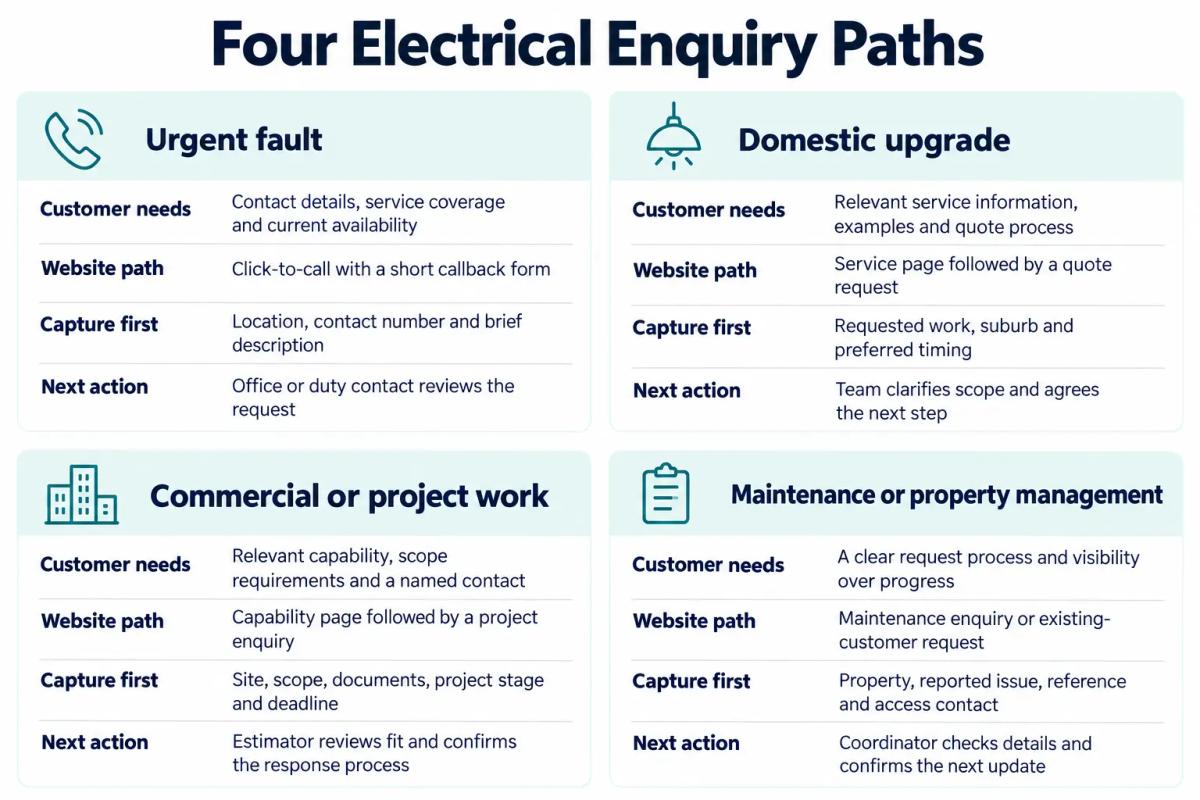
Let customers describe the task
Customer-facing choices should use language people recognise without requiring them to understand your internal departments.
Start with options such as “Report a fault”, “Request a home upgrade quote”, “Discuss a commercial project” and “Arrange maintenance”. Include “Not sure” so an uncertain visitor can still contact the team.
Keep customer type and urgency as separate fields. A fault at a commercial premises may need the urgent contact route while retaining its commercial classification.
2. Give urgent fault enquiries a direct contact path
The urgent fault path should make contacting the business straightforward and accurately describe when that contact channel is monitored.
Place a click-to-call option prominently on the relevant page and mobile layout. Show actual operating hours and avoid suggesting that submitting a form reserves attendance.
Keep the callback form short
The callback form should collect enough information for a return conversation without asking the visitor to diagnose the problem.
Request:
- Contact name and telephone number.
- Suburb or postcode.
- A brief description of what they are reporting.
- Whether the property is a home or business.
Make supplementary details optional. An urgent enquiry should not depend on uploading photographs or completing a lengthy project questionnaire.
Check coverage without implying availability
A service-area check should indicate whether the location falls within the business’s stated coverage, while leaving attendance confirmation to the team.
A postcode result should not say “An electrician is on the way”. If coverage is uncertain, offer a manual check and explain what happens next.
The service-area and cost tools can support early enquiry planning where relevant. Any cost output needs clear assumptions; a website form or calculator cannot assess an installation.
Make the acknowledgement accurate
An acknowledgement should confirm receipt and explain the actual response process.
If the inbox is only checked during office hours, say so before submission and in the confirmation. Automated receipt, human contact and confirmed attendance should remain distinct stages.
3. Build domestic upgrade paths around the requested work
A domestic upgrade path should help the homeowner understand the service before asking for a quote.
Start with a relevant service page, such as lighting, home renovation electrical work or EV charging enquiries. Explain the enquiry process and show genuine examples where available.
Match examples to the enquiry
Examples should help customers recognise a similar project without suggesting that every property needs the same solution.
For lighting enquiries, show completed rooms and describe the customer’s brief. For renovation enquiries, explain how the team gathers project information and coordinates the quoting conversation.
An EV charging page should invite a discussion of the customer’s requirements. It should not imply that a questionnaire can confirm installation suitability.
Ask for useful first-stage scope
The first quote request should capture the customer’s intention, location and timing.
Useful questions include:
- What work would you like to discuss?
- Where is the property?
- Is this a standalone upgrade or part of a renovation?
- When are you hoping to proceed?
- Do you already have relevant plans or a written brief?
Keep document uploads optional unless they are essential to that particular request. The guide to what to put on an electrician's enquiry form expands on choosing fields without overloading the first interaction.
Explain the next step after submission
The confirmation should explain whether the team will call, request further information or discuss arranging a visit.
Avoid labelling every submission “Quote booked”. A request still needs review, and the customer should understand what has actually been confirmed.
4. Give commercial and project enquiries room for scope
Commercial and project enquiries need a route that accommodates documents, deadlines and decision-makers.
A capability page can introduce the sectors and work types the business genuinely handles. Its enquiry route should then collect enough context for an estimator to decide how to proceed.
Capture the project stage and deadline
Project stage and submission timing help the team understand what the customer is asking for now.
Capture:
- Organisation, contact person and role.
- Project location and type of premises.
- A short scope description.
- Project stage, such as early planning or tender.
- Quote or tender deadline.
- Proposed delivery period, if known.
- Available drawings, schedules or scope documents.
Make “Not yet confirmed” a valid answer where appropriate. Someone exploring a tenancy fit-out may not have the same documentation as a builder issuing a defined tender package.
Assign a named contact
A named contact should take responsibility for confirming receipt, checking missing information and agreeing the next update.
For example, an estimator reviewing a retail lighting project could confirm which documents were received and whether the requested submission date is workable. That response gives the customer a clearer position than a generic promise to be in touch.
Where several people contribute internally, keep one person responsible for the customer conversation. Record handovers so a change of owner does not leave the opportunity unattended.
Follow up against project milestones
Project follow-up should reflect the customer’s decision timetable and the next agreed action.
Record whether the team is waiting for revised drawings, clarification, a site meeting or a decision. Pause reminders when the project is deferred, and update the record when the scope changes.
5. Separate maintenance requests from new-business enquiries
A maintenance electrical enquiry should distinguish between an existing customer requesting work and a new customer exploring an ongoing arrangement.
Those requests have different starting points. An existing property manager may need to reference a work order, while a new facilities contact may want to discuss a portfolio of premises.
Give existing customers a practical request form
An existing-customer form should capture the property and coordination details needed to review the request.
Include the property address, reported issue, work-order reference if available, requesting contact and access contact. Keep billing or approval details separate from access arrangements where those people differ.
Do not make the customer repeat a full business introduction each time. Equally, do not treat a submitted request as approval to proceed without the team checking the applicable arrangement.
Give new maintenance prospects a discovery path
A new maintenance prospect should be able to explain the properties, locations and support they want to discuss.
Ask about the number and type of premises, the main coordination contact and their current request process. Use the first conversation to clarify scope rather than asking them to specify technical maintenance requirements through a form.
Separate updates from sales reminders
Maintenance communications should reflect the request’s current status.
Useful stages include received, awaiting clarification, awaiting approval, scheduling under review and completed. Only send updates supported by a real change in the record, and keep new-contract sales follow-up separate from active service requests.
6. Set routing rules, owners and follow-up actions
Electrical lead routing should give every enquiry a responsible owner, a visible status and a next action.
Start with a small set of rules the office can explain and maintain. Add complexity only when real enquiries reveal a need for it.
Route by task, then apply context
Routing should consider the requested work first, then location, urgency and existing-customer status.
A starting sequence is:
- Identify the customer’s selected task.
- Check service-area information.
- Identify an existing account or property reference.
- Apply the appropriate urgency flag for human review.
- Assign an owner and backup.
- Record the next action.
Let staff correct the category without creating another enquiry. Someone selecting “Commercial” may be reporting a fault rather than requesting project pricing.
Give automation a defined job
Automation should acknowledge receipt, assign work and prompt follow-up while leaving scope and attendance decisions with the team.
A practical lead capture and automated follow-up process can support assignment, reminders and visibility over unanswered requests.
Check the capabilities of the actual systems before promising a workflow. Stop generic reminders when a customer replies, declines or agrees a different next step.
Provide a fallback owner
A fallback owner should review requests that cannot be assigned automatically or remain unaccepted.
This includes unclear service categories, missing locations and enquiries received while the usual estimator is away. An internal alert only helps if someone is responsible for acting on it.
7. Measure progress separately for each path
Each path should be measured against its intended next step rather than total form submissions alone.
Separate automated acknowledgements from meaningful human responses. Likewise, distinguish a click on a telephone button from an answered conversation.
Choose measures that match the work
Useful measures show whether the enquiry reached the appropriate person and progressed.
- Urgent faults: answered calls, callback completion and coverage mismatches.
- Domestic upgrades: completed requests, scope clarification, quotes issued and customer decisions.
- Commercial projects: suitable opportunities, documents received, deadlines met and agreed next actions.
- Maintenance: request acknowledgement, missing references, approval delays and status updates.
Record why an enquiry did not proceed. An out-of-area request, a deferred renovation and a lost fit-out tender should not share an unexplained “Lost” label.
Review delays as well as volume
A weekly review should identify enquiries with no owner, no next action or an overdue update.
Read a sample of actual requests alongside the numbers. Repeated clarification questions may reveal a missing form field, while frequent category changes may indicate confusing customer-facing labels.
8. Common mistakes when separating electrical enquiry paths
The most common mistakes occur when the website offers different choices but the office handles every submission identically.
Watch for:
- Different buttons, identical forms: the customer still has to explain everything from scratch.
- Mandatory uploads on every path: a basic lighting enquiry becomes unnecessarily difficult.
- Unmonitored urgent forms: the page creates expectations the team cannot meet.
- Automatic booking language: receipt is mistaken for confirmed attendance.
- Commercial enquiries without deadlines: the estimator cannot prioritise the request properly.
- Maintenance requests mixed with sales leads: active customer work enters an irrelevant follow-up sequence.
- Multiple notifications without ownership: everyone receives the enquiry, but nobody accepts it.
- Reminders that ignore replies: customers receive messages that contradict the conversation.
Correct the process behind each issue before adding more pages or automation.
9. What good looks like
A good enquiry system gives customers an understandable route and gives the office enough context to take the next useful action.
A homeowner can request a lighting quote without navigating tender questions. A builder can submit project scope to a named contact, and a property manager can lodge a request with the right property reference.
Test each path on mobile, then follow its submission through the office process. Check the confirmation, assigned owner, recorded information, next action and follow-up behaviour.
Ready to see where your electrical lead flow is breaking down? request an electrical growth audit with AIECOM Solutions.
10. Frequently asked questions
These answers address common decisions when introducing separate electrical enquiry paths.
Do we need a separate form for every electrical service?
You usually need separate paths for different enquiry processes, rather than a form for every service. Lighting and renovation quote requests may share a domestic form with relevant conditional questions. Commercial projects and existing-customer maintenance requests may need different fields and handling. Start with the distinctions that change the team’s next action.
Can one inbox handle domestic, commercial and maintenance enquiries?
One inbox can work if each enquiry has a clear category, owner and next action. Use a consistent subject format or labels, and agree who checks unassigned requests. As enquiry volume or handovers become harder to manage, assess whether a shared tracking system would make responsibility and follow-up easier to see.
How much information should a commercial enquiry form request?
Request enough information to understand the project, assess whether it fits your business and identify the deadline. Organisation, location, scope, project stage and available documents provide a useful starting point. Allow customers to explain what is still unknown, then use a conversation to resolve details rather than requiring a complete tender package from every visitor.
Should urgent fault enquiries receive automated follow-up?
Urgent fault enquiries can receive an automated receipt message, but it must accurately describe monitoring hours and what happens next. It should not imply that an electrician has accepted the job or that attendance is confirmed. Route the request for human review, and avoid placing it into a generic quote-nurture sequence.
NEXT STEP
Ready to Work With a Team That Actually Delivers?
Book a free strategy call. No pitch. Just honest advice.