Automation & Systems
What to Put on an Electrician's Enquiry Form (and How to Capture Scope on Larger Jobs)
1 October 2026

An electrician enquiry form should ask only for information that helps your team route the job and respond: job type, property type, location, timeframe and urgency, plus contact details. For larger work, add a short scope step covering the areas involved, available plans, site access and who is coordinating the decision.
The challenge is collecting enough context without asking customers to write a project brief on their phone. A vague “Please quote” message creates extra questions, while a long questionnaire can make a straightforward enquiry feel difficult.
As part of your electrical marketing services in Australia, the form should connect the customer’s request to a clear next action. That might be a return call about a fault, a conversation about a domestic upgrade or a review of documents for a commercial project.
1. Why larger electrical enquiries need more context
Larger electrical enquiries need enough scope to identify the right first conversation, even when the customer cannot provide a complete brief.
“Looking for a quote for lighting” could mean replacing fittings in a living room, planning a renovation or coordinating lighting across a commercial tenancy. The same service label can hide very different expectations, access arrangements and decision processes.
What missing scope costs the first conversation
Missing scope makes your first conversation about collecting basic details before you can discuss the customer’s actual request.
If a builder submits “Electrical quote required” without a project location, due date or indication that plans exist, the office has to retrieve each detail. The enquiry may also reach someone who handles domestic bookings when it belongs with the person reviewing project work.
A useful form moves those opening questions into a short, structured step. It should leave technical assessment and detailed clarification to the appropriate person.
Ask for context customers can reasonably provide
Customers should be asked about the property, intended work and project arrangements in their own words.
A homeowner can usually describe which rooms need new lighting or whether an EV charging enquiry relates to a house or a managed property. A facilities coordinator can identify the premises, access contact and whether the request concerns a single task or ongoing maintenance.
Avoid requiring technical specifications simply to start the conversation. Include “Not sure” wherever customers may reasonably need guidance.
2. Essential electrician enquiry form fields
The essential electrician enquiry form fields are those that change how your team assigns, prioritises or answers the request.
Keep the first step relevant to both a small domestic job and a larger project. Conditional questions can then collect additional detail only where needed.
Contact details
Contact details should give your team a practical way to reply without requiring every possible contact method.
Ask for a name and preferred contact method, then require the corresponding phone number or email address. A business or organisation name can remain optional unless the visitor selects commercial or project work.
If phone contact is preferred, offer an optional suitable callback period. Do not imply that selecting a period creates a confirmed appointment.
Job type and property type
Job type and property type help your office identify the relevant service and likely enquiry owner.
Use recognisable job categories that reflect services you actually offer:
- Fault or loss-of-power enquiry.
- Domestic upgrade or renovation.
- Lighting.
- EV charging enquiry.
- Maintenance.
- Commercial fit-out or project work.
- Other or not sure.
For property type, consider house, apartment, strata or common property, commercial premises and other. These categories describe the enquiry; they do not establish whether proposed work is suitable or feasible.
Location
Location helps your team check the service area and understand where the work would take place.
Suburb and postcode may be sufficient for an initial enquiry. Request the full site address when your next step requires it, such as arranging a visit.
Label this field “Job location” so a builder or property manager does not accidentally enter their office address. Explain any service-area limits near the field.
Timeframe and urgency
Timeframe captures when the customer wants the work, while urgency records whether they are seeking prompt contact about a current issue.
Useful timeframe options include “As soon as available”, “Within the next month”, “Planning ahead” and “Working to a project date”. Reveal a date field only when a customer selects the project option.
Treat urgency as the customer’s description of their request. A selection should not be presented as a technical assessment, confirmed priority or promise of attendance.
Brief description
A short description gives customers room to explain details that fixed choices cannot capture.
Use a specific prompt such as: “Tell us what you would like done and which rooms or areas are involved.” For commercial work, suggest including the premises type and the purpose of the project.
Avoid imposing a large minimum word count. A useful sentence is better than a paragraph written to satisfy a form rule.
3. Capture scope details for larger electrical jobs
Scope details for larger electrical jobs should appear in a short additional step triggered by the customer’s selections.
Show this step for renovations, commercial fit-outs, multi-area lighting projects or other work your team treats as a project enquiry. Keep the questions focused on information that changes the follow-up conversation.
Rooms, areas and project stage
Rooms, areas and project stage help your team understand the breadth and maturity of the request.
Ask which parts of the property are involved, with examples such as “Kitchen and living area”, “Shared parking area” or “Office tenancy”. Then ask whether the customer is exploring options, preparing a brief, seeking quotes or coordinating an active project.
An early enquiry and a tender request need different responses. Neither requires the customer to produce a technical design before contacting you.
Plans and supporting documents
Plans and supporting documents give your team material to review before requesting further clarification.
Start with “Are plans or a scope document available?” and provide yes, no and being prepared options. If uploads are supported, make them optional and state the accepted formats and size limits.
For a builder requesting a quotation, ask for the quote due date separately from the intended work date. Do not imply that submitting plans produces a final price or confirms the proposed work.
Site access and decision-maker
Site access and decision-maker details clarify who can arrange the next step and who needs to participate.
Keep these questions practical:
- Is the property occupied, vacant or under construction?
- Are there access hours or appointment arrangements?
- Are you the owner, tenant, builder, property manager or another contact?
- Who is coordinating the quote or project decision?
These answers support scheduling and communication. They do not establish permission to proceed with work.
4. Separate urgent requests from planned and project work
Urgent requests need a shorter contact route, while planned work benefits from additional scope questions.
A visitor reporting a fault should not have to complete the same document-upload step as a builder seeking a fit-out quotation. Start by asking what kind of help the visitor is seeking, then reveal the relevant fields.
Urgent enquiry route
The urgent route should make phone contact visible and clearly explain whether submitted forms are monitored.
Place a click-to-call option beside the form, with accurate contact hours. If the business does not monitor forms continuously, say so before submission.
Do not describe the form as an emergency response service or use answers to declare an installation safe. Any fault-related or electrical-safety wording should be reviewed by a licensed electrician.
Planned and project enquiry route
The planned route should gather enough context to support a callback, document review or discussion about a site visit.
A homeowner requesting lighting work may need only the core fields and a brief description. A commercial enquiry can reveal the additional scope step.
Use a button such as “Send enquiry” or “Request a callback”. “Get an instant quote” would be misleading if the actual next step is a manual review.
5. Example electrical quote request form
A practical electrical quote request form combines a short shared first step with optional project questions.
The following example is a starting point. Remove any field your team does not use.
Step one: tell us about the job
The first step should capture the request and a usable reply method.
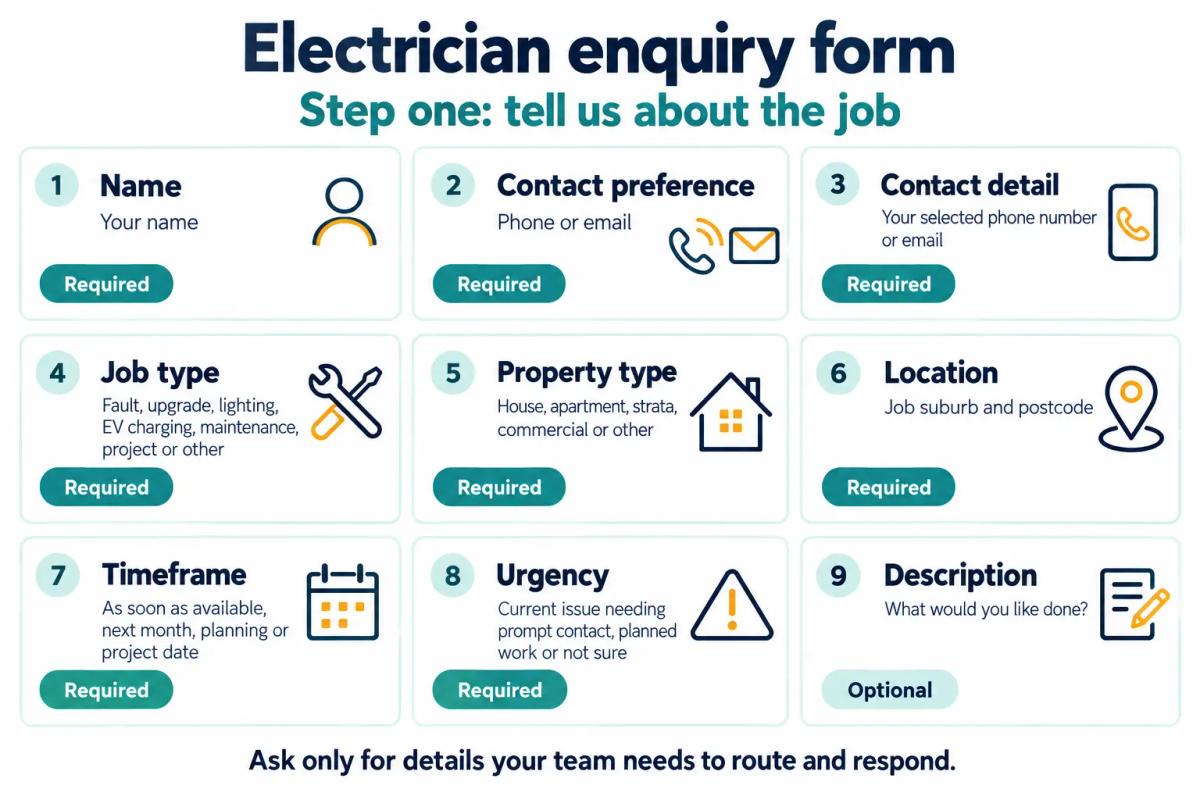
If the selections already explain a straightforward request, the description can remain optional. “Not sure” choices help avoid forcing an inaccurate answer.
Step two: a few project details
The project step should collect additional scope without turning the enquiry into a tender submission.
Use these prompts:
- Which rooms or areas are involved?
- What stage is the project at?
- Are plans or a scope document available?
- Is there a quote deadline?
- What site-access arrangements should we know?
- What is your role in the project?
Allow an optional document upload where supported. End with a reminder that the team will review the request and confirm the next step.
6. Make the electrician contact form easy to use on mobile
An electrician contact form should be easy to complete with a phone keyboard and a small screen.
Customers may be enquiring from home, between appointments or while coordinating a property visit. Clear labels and a short sequence help them describe the job without unnecessary effort.
Labels, controls and error messages
Visible labels and specific error messages help customers complete the form and correct mistakes.
Use a single-column layout, suitable phone and email keyboards, and controls that do not require precise tapping. Preserve completed answers when someone misses a required field.
Test conditional fields and uploads on mobile as part of your website design and branding for electrical businesses. Check that customers can return to an earlier step without losing their work.
Trust beside the submit button
Relevant business information helps customers understand who will receive their request.
Place contact details, service-area information and a short explanation of the next step near the form. Any credentials or reviews displayed there should be accurate and verifiable.
Use the same approach described in trust signals for an electrician's website. Keep the enquiry page focused and avoid unsupported claims about availability.
7. Give every submission an acknowledgement and an owner
Every submitted enquiry should receive a clear acknowledgement and reach someone responsible for the next action.
The form is only useful if the information reaches a working process. Define who handles domestic requests, project enquiries and requests that do not fit the normal categories.
Confirm receipt and set expectations
The confirmation message should explain what was received, what happens next and when the customer can reasonably expect contact.
For example:
Thanks for your enquiry. Our office team will review the details and contact you using your selected method. Submitting this form does not confirm a booking.
Add a response window only after checking what the team can consistently support. If email is optional, do not promise an email acknowledgement to every visitor.
Route the enquiry and manage the handover
Routing should assign the request to a named person or monitored queue with a clear fallback.
Record the enquiry type, submission time, owner and next action. Decide who covers absences and how unanswered enquiries are identified.
Your lead capture and automated follow-up process can support this handover where the required functionality is available and tested. Automated receipt messages should remain distinct from a person’s response or a confirmed booking.
8. Keep privacy explanations close to the form
Privacy explanations should help customers understand why information is requested and what will happen after submission.
Use plain language near the submit button and provide access to the business’s current privacy information. Check your state or territory requirements.
Collect only useful information
Useful information is information your team needs for the stated enquiry process.
Avoid requesting identity documents or unrelated personal details. For uploads, ask customers to exclude material that is not relevant to the proposed work.
Keep any optional marketing invitation clearly separate from the job enquiry. Have the responsible person review data collection, access, storage and retention arrangements before launch.
9. Common mistakes to avoid
Common mistakes make the form harder to complete or leave the team with information it cannot use.
Watch for:
- One questionnaire for every job: a small lighting enquiry rarely needs a full project brief.
- Required technical answers: customers may guess when “Not sure” would be more accurate.
- Unclear dates: quote deadlines and intended work dates serve different purposes.
- Mandatory uploads: customers may not have documents available on their phone.
- Unsupported response promises: published expectations need an operational basis.
- No assigned owner: an inbox notification alone does not establish responsibility.
- Technical conclusions from form answers: a website form cannot assess an installation.
10. What a good enquiry process looks like
A good enquiry process gives the customer an easy way to explain the job and gives your team a clear next action.
The office can see the job category, property, location, timeframe and contact preference. Larger enquiries include enough scope to identify useful follow-up questions.
Review real submissions with the people answering them. If the same detail is repeatedly missing, improve the prompt; if a field never affects the response, consider removing it.
Ready to see where your electrical lead flow is breaking down? request an electrical growth audit with AIECOM Solutions.
11. Frequently asked questions
These answers cover common decisions about electrician website form fields and project scope.
How many fields should an electrician enquiry form have?
An electrician enquiry form should contain only the fields your team uses to route and answer the request. Start with contact details, job type, property type, location, timeframe and urgency, then offer a short description. Reveal project questions conditionally. The useful measure is whether customers can complete the form and staff can act on the answers, rather than a fixed field count.
Should customers upload photos or plans?
Photos and plans should usually be optional at the initial enquiry stage. They can provide context for lighting requests, renovations or commercial project discussions, but some customers will not have files ready. Explain accepted formats and limits, and provide another way to submit the enquiry. Uploaded material supports a conversation; it does not allow a website form to assess an installation.
Should urgent electrical enquiries use the same form?
Urgent enquiries can share the same underlying system, but the visible route should be shorter and include a prominent phone option. Clearly state monitoring hours and avoid suggesting that a form submission guarantees prompt attendance. Keep planned-job scope questions out of this route. Have a licensed electrician review any wording that refers to faults, emergency situations or electrical safety.
What should happen after someone submits a project enquiry?
A project enquiry should show a receipt confirmation and reach the person responsible for reviewing that type of work. The reviewer can check the location, areas involved, project stage, available documents and quote deadline before replying. Tell the customer what happens next and use only a verified response window. Acknowledging receipt should not imply that a booking, price or project acceptance is confirmed.
NEXT STEP
Ready to Work With a Team That Actually Delivers?
Book a free strategy call. No pitch. Just honest advice.