Automation & Systems
What to Put on a Pest Control Enquiry Form (and What to Leave Off)
28 September 2026

A pest control enquiry form should ask only for what your team needs to route and respond: property type, the concern in the customer’s own words, location, timeframe and preferred contact method. Add a name and the contact detail needed to reply, then leave detailed questions for the next conversation.
The challenge is collecting enough information without making a worried customer complete an assessment they are not qualified to make. A form cannot identify a pest or assess a property, and its wording should never suggest otherwise.
For businesses reviewing their enquiry process, our pest control marketing services in Australia connect website content, enquiry capture and follow-up. Start by giving every form field a clear operational purpose.
1. Give your pest control enquiry form a clear job
Your form’s job is to start a useful conversation and direct the enquiry to the right person.
“Please call me about pest control” leaves several questions unanswered. Your office still needs to establish whether the person wants a general treatment, an inspection, an ongoing plan or a discussion about commercial premises.
A more useful enquiry might say: “I manage a café in your service area and want to discuss an ongoing service before we open next month.” That gives your team a starting point without asking the customer for technical conclusions.
Separate enquiry capture from confirmed bookings
An enquiry form should describe the next step accurately, especially when availability needs checking.
If someone submits a preferred day, make clear that it is a request. Avoid calling the form a pest control booking form unless the process actually confirms an appointment.
Use “Send enquiry” or “Request a callback” when a staff member must review the details first. Reserve booking language for a process that supports it.
2. Choose fields that support a specific decision
The most useful pest control form fields help your team check coverage, assign responsibility and prepare a relevant response.
Before adding a question, ask: “What will we do differently because we know this?” If the answer is unclear, consider leaving it for follow-up.
Name and preferred contact method
Ask for a contact name and let the visitor choose from the response channels your team actually monitors.
If they select phone, require a phone number. If they select email, require an email address; do not make both compulsory without an operational reason.
Offer text messages only if someone manages replies. An optional preferred contact time can help with a property manager who is moving between sites or a café operator working around opening hours.
Property type and customer role
Use broad property categories to help distinguish residential, shared-property and commercial enquiries.
Suitable options might include:
- House or townhouse.
- Unit or apartment.
- Strata or shared areas.
- Commercial premises.
- Food premises.
- Other or unsure.
Where responsibility matters, add an optional “Who are you enquiring for?” question. Owner, tenant, property manager, strata manager and business representative are useful choices.
Do not require tenancy documents, strata records or proof of authority at this initial stage. Establish what further information is needed during follow-up.
Reason for the enquiry
Offer service-level choices that reflect the work your business actually handles.
These could include general treatment, inspection, ongoing service plan, existing service enquiry and “Not sure—please contact me”. A visitor should be able to continue without choosing a technical category.
For commercial enquiries, an optional business name may help your office recognise an existing account. Detailed site questionnaires can come later.
Concern in the customer’s own words
Ask “What have you noticed, or what would you like help with?” instead of requiring a pest identification.
Example helper text could say:
Briefly describe your enquiry and where you noticed the concern. You do not need to identify the pest.
A customer might describe activity near a storeroom or request an inspection before discussing an ongoing plan. Capture that description without turning it into a diagnosis or a property assessment.
Location
Start with suburb and postcode when that is enough to check whether the enquiry falls within your service area.
Ask for a full street address only when your next step requires it. Explain the purpose if you need it before responding.
If you use a service-area check tool, check that its coverage information matches your current operations. Describe coverage results separately from appointment availability.
Requested timeframe
Ask when the customer would like to hear from you or arrange a service discussion.
Options might include “As soon as available”, “This week”, “Planning ahead” and “Flexible”. Treat these as preferences for staff review, not automatic judgements about the concern.
For a restaurant, property manager or strata enquiry, an optional date can capture an opening date, access window or meeting deadline. Make clear that requested dates are subject to confirmation.
3. Leave detailed assessment questions off the first form
The first form should collect enough information for a response without becoming a technical questionnaire.
If you are deciding what to ask on a pest control website form, work backwards from the first staff action. Detailed questions belong later when their purpose and relevance are clear.
Avoid compulsory pest identification
Do not make visitors choose a pest species before they can contact you.
Include “Unsure” wherever a service category could cause confusion. Avoid questions that ask customers to assess severity, select products or decide what treatment is appropriate.
Similarly, do not use automated form results to make property-specific conclusions. The acknowledgement should confirm receipt, not announce an assessment.
Keep additional notes focused
Use an optional “Anything else we should know about arranging a response?” field with examples that keep answers practical.
Useful prompts include preferred callback times, whether the enquiry concerns shared areas, and whether a property manager coordinates access. Do not request sensitive personal information, access codes, payment details or identity documents.
Leave photo uploads off the first version unless your team has a defined reason and handling process. If offered, keep them optional and explain that submitting an image does not provide an identification or assessment.
4. Build a pest control contact form that works on mobile
A mobile form should be easy to read, complete and correct without repeated zooming or scrolling between columns.
Use a single-column layout, visible labels above fields and clear required or optional markers. Do not rely on placeholder text that disappears once someone starts typing.
Make choices and errors straightforward
Use short option lists, readable text and buttons that are easy to select.
Display an explanation beside any field that needs correction, such as “Enter an email address so we can reply by email”. Preserve the other answers when a visitor fixes an error.
Test the form on actual phones, including with the on-screen keyboard open. Include keyboard navigation and clear focus indicators in the review.
Put click-to-call beside the form
Place a visible phone option near the form for visitors who would rather speak to someone.
State the hours when calls are handled, using verified business information. Do not suggest that a phone line or online form is monitored continuously unless it is.
A review of website design and branding for pest-control businesses should include these practical details alongside layout, wording and visual consistency.
5. Use this example form as a starting point
This example captures a useful first enquiry while leaving detailed discussions to your team.
Adapt the choices to your services and remove any option your business cannot support.
Example: Tell us what you need help with
The form introduction should explain its purpose and set expectations before the visitor starts.
Share a few details so our team can respond to your enquiry. You do not need to identify the pest. Submitting this form does not confirm an appointment or assess your property.
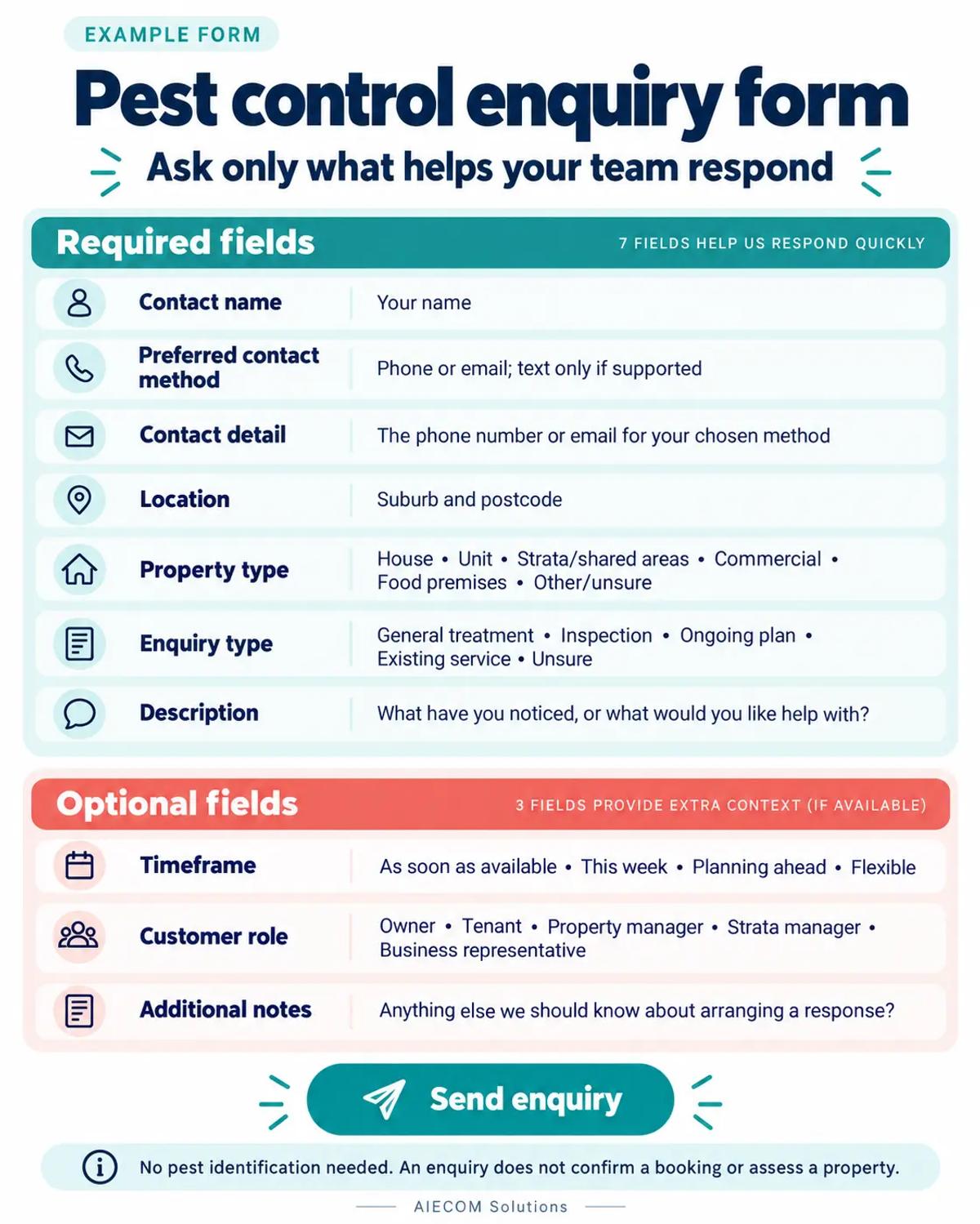
Use Send enquiry as the button label.
If this feels too long for your workflow, remove optional questions before adding extra pages or steps. Each retained field should earn its place.
Example: On-screen confirmation
The confirmation should state that the enquiry was received and explain what happens next.
Thank you—your enquiry has been received. Our team will review the details and contact you using your selected method. Any requested appointment date is subject to confirmation.
Use this wording only if the process supports it. Add a response window only after checking what your team can consistently manage; otherwise, explain the next step without promising a deadline.
6. Decide what happens after submission
Every submitted enquiry needs a responsible person, a visible status and a next action.
Form design alone cannot resolve an enquiry that sits in an unmonitored inbox. Plan lead capture and automated follow-up around the actual people and processes handling the work.
Assign an owner and a backup
Create simple routing rules based on the information you genuinely use.
For example, residential enquiries might go to the office coordinator, while commercial plan requests go to the person handling those discussions. Property manager and strata enquiries may need a named contact who can coordinate access arrangements.
Define who checks unassigned enquiries and covers absences. During seasonal peaks, use the pest control seasonal preparation checklist to review enquiry handling alongside staffing and availability.
Match acknowledgements to the available contact details
Send acknowledgements only through channels your process supports and for which the visitor has supplied the necessary details.
If email is optional, do not promise everyone an email confirmation. An on-screen message should still explain what happens next.
Keep the acknowledgement factual: receipt, next step and verified timing where available. Avoid language suggesting that a quote, appointment or assessment is already complete.
Review enquiry quality alongside response handling
Look at whether staff receive enough information to make a relevant first response.
Record recurring missing details and unnecessary questions before changing the form. For the wider acquisition context, see how pest control companies get more qualified leads.
7. Keep privacy information clear and practical
Explain why you are collecting the details and how they will be used to respond.
Place a short explanation near the submit button and make your privacy information easy to find on the live website. Check your state or territory requirements.
Separate service enquiries from marketing choices
Keep any newsletter or promotional opt-in separate from submitting an enquiry.
Do not make promotional subscription a condition of requesting contact. Internally, decide who needs access to enquiries, where they are stored and how long they are retained.
These decisions should reflect your actual systems and documented practices. Avoid broad privacy promises that your business has not verified.
8. Avoid common enquiry form mistakes
The most common design mistakes are questions and promises that do not match the next operational step.
Review your form for:
- Compulsory pest identification: allow descriptions and uncertainty.
- Too many required fields: keep only those needed for the initial response.
- Mandatory phone and email: require the detail needed for the selected channel.
- Premature booking language: distinguish requests from confirmed appointments.
- Unrealistic response promises: match published wording to staffing.
- Unclear ownership: assign someone to review each enquiry.
- Generic confirmation messages: explain what happens after submission.
- Unnecessary sensitive information: keep questions focused on the service enquiry.
Test the whole process after any change. Submit residential, commercial and strata examples, then check delivery, routing, confirmation messages and staff visibility.
9. What good looks like
A good enquiry form gives customers a manageable first step and gives your team enough context to respond.
The visitor can describe their concern without identifying a pest. Your office can see the property type, location, requested timeframe and preferred contact channel.
Behind the form, someone owns the response, requested dates remain clearly provisional, and published expectations match the service you can provide.
Ready to see where your pest control lead flow is breaking down? request a pest control growth audit with AIECOM Solutions.
10. Frequently asked questions
These answers address practical choices about form length, customer descriptions and booking expectations.
How many fields should a pest control enquiry form have?
Use as many fields as your team needs for a useful first response, with a clear purpose for each one. Start with contact details, property type, concern and location, then decide whether timeframe and enquiry type affect routing. Keep additional notes optional. Review where staff repeatedly need clarification before adding another compulsory question.
Should customers have to identify the pest?
No, customers should be able to submit an enquiry without identifying a pest. Ask what they have noticed and where, using their own words. Include an “Unsure” option in any relevant category list. The form should capture a description for follow-up and must not imply that its questions, selections or uploaded images provide an identification or property assessment.
Should a pest control form ask for the full address?
Ask for a full address when the next step genuinely requires it. For an initial service-area check or callback request, suburb and postcode may be enough. If your office needs the street address to progress the enquiry, explain why. Property managers handling multiple sites can provide further property details during the follow-up conversation.
Can an enquiry form also confirm a booking?
It can only confirm a booking if the process actually supports appointment confirmation. If staff still need to review the request or check availability, describe it as an enquiry or booking request. Show any selected date as a preference and repeat that distinction in the confirmation message. Avoid presenting an automated acknowledgement as acceptance of an appointment.
NEXT STEP
Ready to Work With a Team That Actually Delivers?
Book a free strategy call. No pitch. Just honest advice.