Automation & Systems
How to Prepare a Pest Control Business for the Warmer Months: A Response-Process Checklist
24 September 2026

Pest control seasonal preparation starts with a reliable response process: test where enquiries go, assign someone to respond and confirm what customers should expect next. Fix these basics before increasing promotion or opening more booking slots.
The problem to prevent is a gap between receiving an enquiry and taking responsibility for it. A general treatment request, a property manager’s inspection enquiry and a commercial premises callback each need a clear next action. Our pest control marketing services in Australia bring these customer journeys into the broader marketing discussion.
Use this checklist to prepare your forms, phone handling, service pages and follow-up workload. Base your preparation on your own enquiry history and available capacity, rather than assuming every service or location follows the same seasonal timetable.
1. Start pest control seasonal preparation with your enquiry history
Your enquiry history should guide which services, response channels and staffing gaps you prepare first.
Review the periods you consider busy, looking beyond total enquiry numbers. Identify which requests arrived, when they arrived and where progress stalled.
Identify the work that needs preparation
Prioritise service categories using recorded demand and the work your business intends to accept.
Separate enquiries into useful groups, such as general treatments, inspections, ongoing service plans, commercial and food premises, and property manager or strata requests. Keep customer-reported service requests separate from any findings established through your professional process.
Review:
- Enquiry volume by service category and week.
- Forms, calls and emails received outside office hours.
- Time between receipt and the first useful response.
- Requests awaiting access arrangements or booking decisions.
- Quotes and callbacks that remained open.
- Enquiries outside your service area.
If records are incomplete, start a simple log now. Avoid filling the gaps with assumptions about a national pest control busy season.
Set response targets around actual capacity
Choose response targets your team can support alongside existing bookings and ongoing customer commitments.
Define when new enquiries are reviewed, who handles after-hours messages and what happens when the usual owner is unavailable. Distinguish an acknowledgement from a meaningful response that addresses the request.
Use your pest control marketing plan for Australia to align promotional activity with this capacity. If you promote ongoing commercial plans, for example, allow time for the conversations and coordination those enquiries require.
2. Checklist one: test forms, phone and inbox routing
Every enquiry channel should deliver a usable record to a monitored destination with a clear next action.
Test the complete journey from a customer’s perspective. A form confirmation or ringing phone does not, by itself, show that someone will respond.
Submit realistic test enquiries
Run separate tests for the different requests your business accepts.
Examples include a homeowner asking about a general service, a property manager coordinating an inspection and a food premises operator requesting a discussion about an ongoing plan. Use fictional details and label each submission as a test.
Check that:
- The form submits successfully on mobile and desktop.
- The customer sees an accurate confirmation message.
- Contact details and the service requested reach the correct inbox.
- The notification includes enough context for a callback.
- A team member can find the enquiry without relying on one person’s email.
- The request enters the list used to track outstanding work.
- Any routing failure becomes visible to someone responsible.
Keep forms focused on contact and administrative details. Do not describe a form as identifying a pest, assessing a property or determining the service required.
Check phone and shared inbox handling
Test answered calls, missed calls, voicemail and direct emails as separate enquiry paths.
Call during office hours and test your published after-hours process. Confirm that voicemail messages are accessible and that a missed call creates a callback task your team actually reviews.
For shared inboxes, agree how staff mark a message as assigned or answered. An unread message count is not a reliable substitute for an enquiry status.
Review service-area questions
Use location questions to support routing and service-area checks without presenting them as property assessments.
If you direct customers to the service-area check tool, verify that its coverage information matches your current operating area. Explain what customers should do if their location needs confirmation.
Test the enquiry path for an address outside your usual coverage. It should lead to a clear response, rather than leaving the customer waiting indefinitely.
3. Checklist two: assign an owner, backup and escalation path
Each enquiry needs one named owner who is responsible for moving it to the next stage.
A shared inbox gives people access; ownership tells them who must act. The owner can delegate a task, but should remain responsible until the handover is accepted.
Define ownership by enquiry type
Assign enquiries according to your team’s responsibilities and the coordination each request needs.
Use a simple allocation table as a starting point, replacing the suggested roles with named staff.
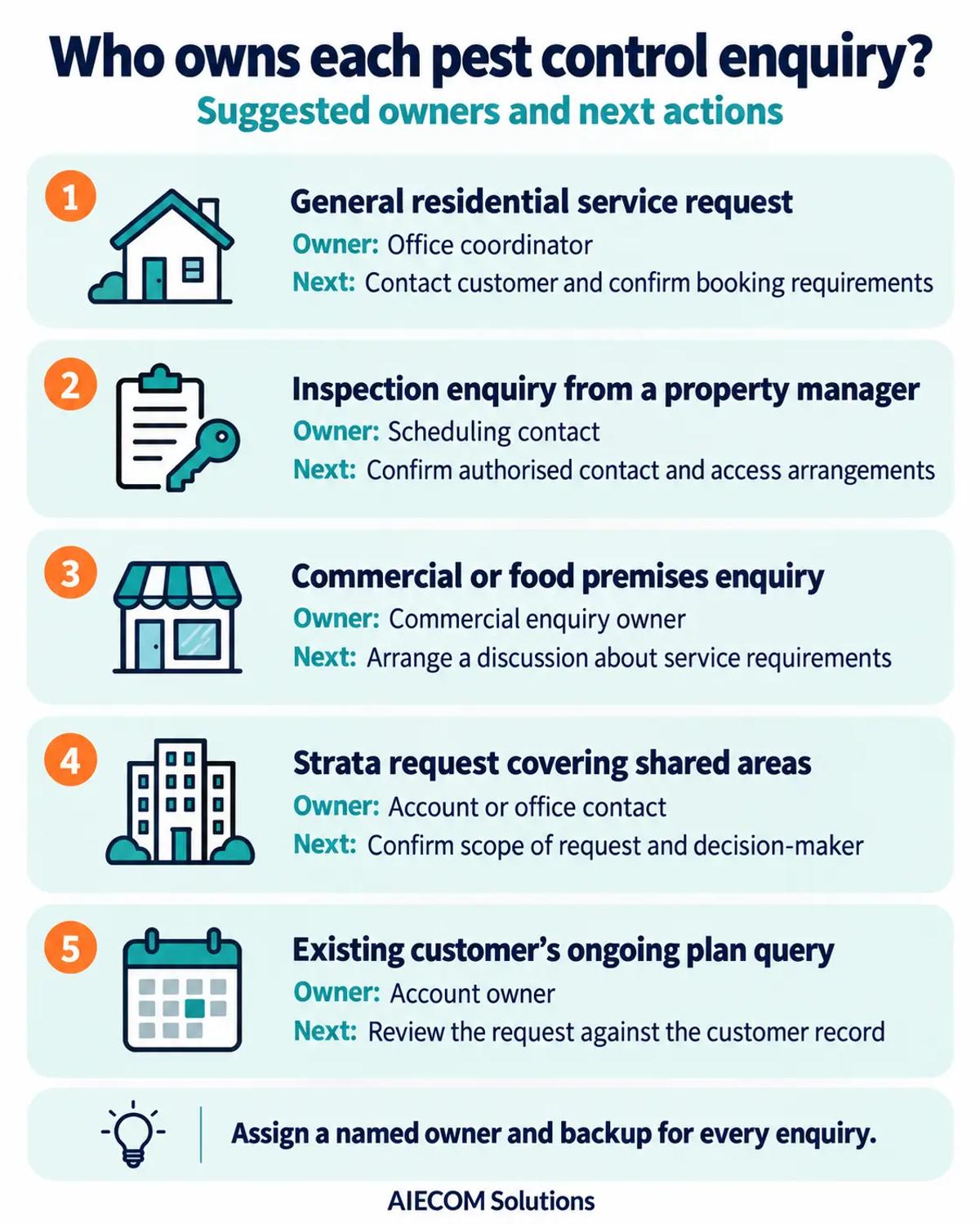
Record ownership where the team manages work. Avoid leaving the assignment only in a forwarded email or verbal instruction.
Make backup coverage practical
Give the backup owner access to the information and systems needed to continue the conversation.
Check coverage for leave, lunch breaks, site visits and days when office staff also handle scheduling. A backup arrangement is incomplete if only the primary owner can access voicemail or view the customer’s previous message.
The handover should include the enquiry summary, last contact, promised next step and due time. For property managers and strata contacts, include any outstanding access or approval arrangements.
Define when an enquiry is escalated
Escalate enquiries when a response commitment is at risk or the owner cannot resolve the next administrative step.
Examples include an unassigned request, a callback that has passed its due time or a booking question requiring a manager’s decision. Base escalation on workflow and responsibility, rather than assumptions drawn from a customer’s pest description.
4. Checklist three: make acknowledgements clear and accurate
An acknowledgement should confirm receipt and explain the next step without implying a booking or assessment has occurred.
Keep the message short enough to read on a phone. Its purpose is to remove uncertainty about whether the request arrived.
State what has happened and what happens next
Tell customers that their enquiry has been received, when messages are reviewed and how your team will respond.
A draft structure is:
Thanks for contacting [business name]. We’ve received your enquiry about [selected service]. Our office reviews enquiries during [verified office hours], and our team aims to respond within [verified response timeframe]. This message confirms receipt; your booking is not yet confirmed.
Replace every placeholder before use. Only include a service category if the customer selected it and the message can reproduce it accurately.
Avoid statements such as “your technician is on the way” unless the booking and dispatch process supports that message.
Match timing messages to office coverage
Make acknowledgement wording consistent with your actual office hours, weekends and closure periods.
If the same message goes out at all times, make its timing clear enough to remain accurate after hours. If you use different messages, test the conditions that select each version.
Check these points:
- The stated response window is achievable.
- Replies reach a monitored destination.
- The sender name identifies your business.
- The message does not promise an available appointment.
- Customers are not asked to submit the same information again unnecessarily.
Review the wording when staffing or capacity changes. An outdated response promise creates a commitment your team may no longer be able to meet.
5. Checklist four: prepare priority service pages and mobile contact options
Priority service pages should help customers understand what they can enquire about and how to contact your team.
Start with the services you intend to promote and have capacity to discuss. These might include general services, inspections, ongoing plans or commercial enquiries, depending on your offering.
Make each page support a relevant enquiry
Explain the service category, the customers you work with and the administrative steps involved in making an enquiry.
For property managers, clarify how to provide a property reference and arrange a discussion about access. For commercial and food premises, explain how to request a conversation about service requirements and scheduling.
Review each priority page for:
- Accurate service descriptions.
- Current service-area information.
- A clear phone number and enquiry button.
- Office hours and realistic response wording.
- A distinction between requesting a booking and receiving confirmation.
- Forms that preserve the selected service category.
Remove outdated availability statements. Check your state or territory requirements before publishing claims about licensing or regulated services.
Test the mobile contact journey
Check that a customer can move from reading a service page to contacting the right person on a phone.
Tap the click-to-call link and verify the number. Complete the form on a small screen, checking that labels, error messages and confirmation text remain readable.
Make the contact options easy to find without obscuring the service information. If the layout or enquiry journey needs work, website design and branding for pest-control businesses can support a clearer experience.
6. Checklist five: plan booking and pest control follow-up workload
Booking and follow-up need allocated time alongside the work of answering new enquiries.
Prepare for seasonal demand in pest control by deciding how much administrative work your team can handle. Include existing customers and ongoing commitments in that calculation.
Give every open enquiry a next action
Track the specific task needed to progress each request, with an owner and due date.
Useful statuses include new, assigned, awaiting customer information, awaiting access arrangements, quote sent, booking proposed, confirmed and closed. Use only the statuses your team can maintain consistently.
For example:
- A residential enquiry may need a callback about appointment options.
- A property manager’s request may be waiting for access confirmation.
- A strata enquiry may need approval from the nominated decision-maker.
- A commercial enquiry may need a scheduled conversation before a proposal.
Avoid treating every open record as a request that needs another sales message.
Use follow-up that reflects the conversation
Make each follow-up relevant to the customer’s outstanding decision or administrative task.
A property manager waiting on access arrangements needs a different message from a homeowner reviewing a quote. An existing commercial customer’s scheduling query also needs to remain distinct from a new service enquiry.
Before using automation, define when messages start, stop and pause. Lead capture and automated follow-up should support those decisions, with human review where the conversation requires it.
Test that booking confirmation, a customer reply or a closed enquiry prevents inappropriate reminders. Verify these behaviours in your actual setup.
Protect time to review outstanding work
Reserve a daily review period for unassigned enquiries, overdue callbacks and stalled bookings.
During busier periods, check whether the published response message still reflects capacity. If the queue is growing, adjust internal coverage or customer expectations before making additional promises.
7. Common mistakes to avoid before demand builds
The main mistakes are gaps between what customers are told and what the team can deliver.
Look for these problems during your preparation:
- Testing only the form: also check the destination, owner and next action.
- Assigning enquiries to “the office”: name the person responsible and their backup.
- Promising a fast reply without coverage: match the message to working hours and workload.
- Using one follow-up for every request: reflect access, approval and scheduling differences.
- Leaving old availability messages online: review service pages and acknowledgements together.
- Counting acknowledgements as completed responses: track the first useful human response separately.
- Adding form questions without a purpose: collect only what supports contact and routing.
- Increasing promotion while callbacks remain overdue: resolve the response backlog before adding workload.
Keep the process simple enough to use on a demanding day. Extra fields and statuses only help if staff can maintain them.
8. What good looks like before the warmer months
A prepared pest control business can show where each enquiry is, who owns it and what happens next.
Run a final rehearsal across a residential request, a property manager’s inspection enquiry and a commercial service conversation. Follow each one from initial contact through acknowledgement, assignment, response and closure or booking.
Your checklist is complete when:
- Enquiry channels have passed end-to-end tests.
- Every request has an owner and backup.
- Response messages match actual coverage.
- Priority service pages have current information.
- Outstanding enquiries have a next action and due date.
- Follow-up stops or changes when the conversation moves forward.
Use the rehearsal to fix specific failures, then review the process as workload changes.
Ready to see where your pest control lead flow is breaking down? request a pest control growth audit with AIECOM Solutions.
9. Frequently asked questions
These answers cover when to prepare, what to automate and how to keep the checklist manageable.
When should a pest control business start preparing for busier months?
Start early enough to test the full enquiry journey and correct any failures before your own records suggest an increase in demand. Review previous enquiry dates, service categories and response delays rather than relying on a fixed national calendar. If you lack historical records, prepare the basic routing and ownership process now, then start logging enquiries to inform future planning.
What should a pest control enquiry acknowledgement include?
Include confirmation that the message arrived, your enquiry-review hours and a realistic indication of the next response. Make clear whether the customer has requested an appointment or received a confirmed booking. Use a monitored reply destination and accurate business details. The acknowledgement should not imply that a form submission has identified a pest, assessed the property or determined the appropriate service.
Can a small pest control business manage follow-up without a CRM?
A small team can use a shared enquiry register if it reliably records ownership, status, last contact, next action and due date. The key is maintaining one current view of outstanding work. Review whether staff can find and update records during busy periods. Consider a more structured system when manual handovers and reminders become difficult to maintain consistently.
What should be automated first?
Start with a repeatable administrative step that has a clear trigger and outcome, such as acknowledging receipt or notifying the assigned enquiry owner. Test it before adding further steps. Follow-up requires additional rules so messages pause or stop when someone replies, books or closes the enquiry. Keep decisions requiring a conversation with the customer under human review.
NEXT STEP
Ready to Work With a Team That Actually Delivers?
Book a free strategy call. No pitch. Just honest advice.