Automation & Systems
How to Prepare an HVAC Business for the Summer Peak: A Response-Process Checklist
20 September 2026

To prepare an HVAC business for summer, fix the response process before increasing advertising or taking on more enquiries. Every call, form submission and email needs a clear destination, an owner and a follow-up step.
During the air conditioning summer rush, even a healthy pipeline can become difficult to manage when breakdowns, replacement requests, maintenance work and commercial enquiries arrive together. A structured response process helps your team separate urgent work from planned opportunities without making promises it cannot keep. AIECOM Solutions provides HVAC marketing services in Australia for businesses reviewing this wider customer journey.
Use the following checklist before seasonal demand begins to test your systems.
1. Map the HVAC enquiry journey before demand increases
The first step is to document what happens from the moment an enquiry arrives until it is booked, quoted, declined or closed.
Many HVAC businesses have several enquiry channels but no single view of how they connect. A customer might call from a service page, submit a quote form, email the office or send a message outside business hours.
Identify every enquiry source
Every active enquiry source should be listed and assigned to a person or shared system.
Check the following:
- Main business phone number
- Mobile numbers published online
- Website contact forms
- Service-specific quote forms
- General email inbox
- Google Business Profile contact options
- Social media messages
- Existing customer or maintenance email addresses
- Builder, facility manager and property manager referrals
- Manufacturer, supplier or trade-partner referrals
Include informal channels that staff have started using. If customers regularly contact a technician’s personal mobile, decide whether that number remains part of the process or should direct people elsewhere.
Separate immediate and planned enquiries
Breakdown work and planned HVAC work require different response paths.
A failed split system during hot weather may require a quick availability decision. A ducted replacement, new installation, maintenance agreement or commercial project usually needs more information before anyone can confirm the next step.
Your initial categories might include:
- Breakdown or no-cooling enquiry
- Existing customer service request
- Split-system installation
- Ducted-system installation or replacement
- Preventive maintenance
- Commercial service or maintenance agreement
- Builder or property manager request
- Enquiry outside the service area
- Work the business does not provide
The purpose is not to create a complicated classification system. It is to help the team respond appropriately instead of treating every submission as the same type of lead.
For a more detailed framework, review breakdown vs planned HVAC enquiries.
2. Test forms, phones and inbox routing end to end
Routing is ready for summer only when the team has tested each channel as if it were a real customer.
A form displaying a success message does not confirm that the office received the submission. Likewise, a ringing phone does not confirm that missed calls are recorded or returned.
Test every website form
Each website form should be submitted from both a desktop computer and a mobile phone.
For every test, confirm:
- The form can be completed without errors.
- Required fields are appropriate.
- The customer receives a clear confirmation.
- The submission reaches the correct inbox or system.
- The responsible staff member receives a notification.
- The source and requested service remain visible.
- The team can identify whether the enquiry was actioned.
Also test unusual but valid entries, including apartment addresses, commercial locations and customers without a preferred installation date.
If service areas affect whether an enquiry can be accepted, consider giving customers access to a service-area checker before they submit a detailed request.
Check phone and missed-call handling
Phone routing should make it clear what happens when the primary person is busy, unavailable or already speaking with another customer.
Test:
- Calls during normal opening hours
- Calls while the main line is engaged
- Missed calls
- Voicemail notifications
- Calls outside business hours
- Calls transferred between team members
- Calls made from numbers not saved in your contacts
Listen to the voicemail message as a customer would. It should state the business name, set a reasonable expectation and explain what information the caller should leave.
Review shared inbox behaviour
A shared inbox needs visible ownership so that messages are not answered twice or left untouched.
The team should be able to see whether an enquiry is:
- New
- Assigned
- Waiting for customer information
- Ready for scheduling
- Requiring a quote
- Being reviewed
- Closed or declined
The exact labels matter less than consistent use. Avoid relying on individual memory during a busy week.
3. Assign an owner, backup and escalation path
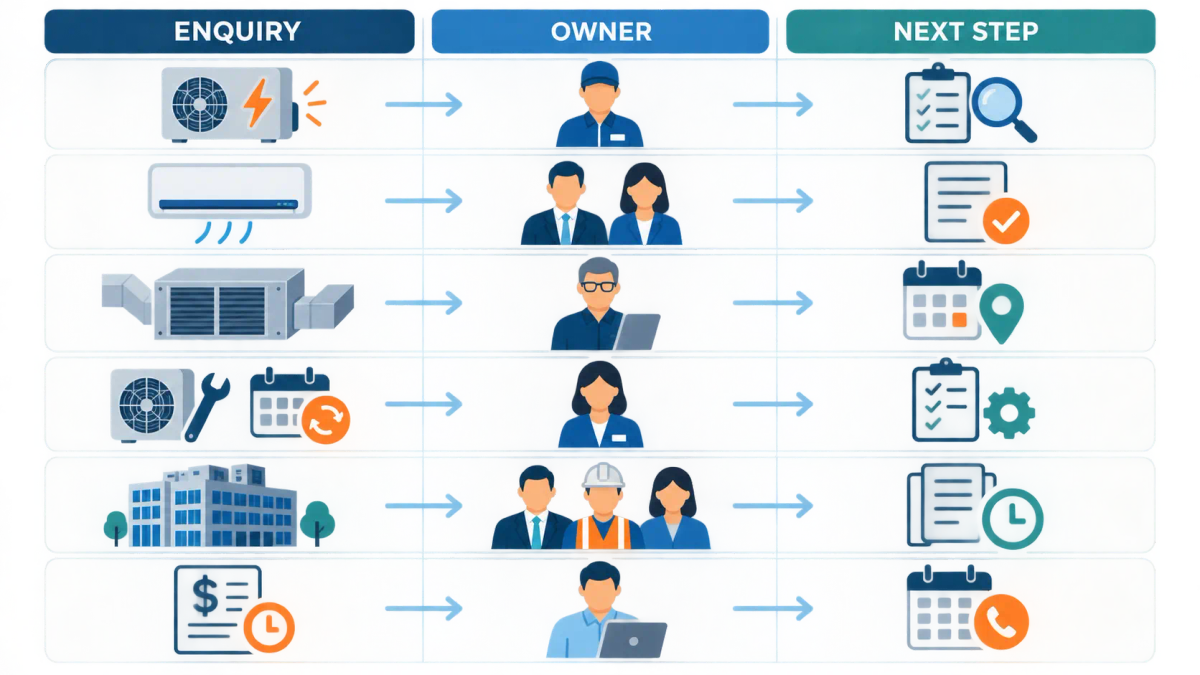
Every HVAC enquiry should have one primary owner, one backup owner and a defined escalation point.
Without clear ownership, office staff may assume a technician will respond while the technician assumes the office has handled it. Shared responsibility often becomes no responsibility.
Define the primary owner
The primary owner should be responsible for moving the enquiry to its next recorded stage.
Ownership may differ by enquiry type. For example:
Nominate a backup owner
A backup owner prevents enquiries from waiting when the main person is on site, on leave or unavailable.
The backup should know:
- When responsibility transfers
- Where enquiry details are stored
- Which responses they can send
- What they may book without approval
- What must be escalated
- How to return ownership when the primary person is available
A backup arrangement is useful only if the person receives the relevant notifications and has access to the necessary information.
Create an escalation rule
An escalation rule defines what happens when an enquiry has not been actioned within the business’s chosen response window.
The rule should identify:
- Which status triggers escalation
- Who receives the alert
- Whether the backup takes ownership
- How urgent and planned enquiries differ
- When management needs to review the issue
Businesses exploring lead capture and automated follow-up should establish these ownership rules before automating them. Automation can route or remind, but the team still needs to know who is accountable.
4. Set clear expectations for after-hours enquiries
After-hours handling should acknowledge the enquiry without implying that an immediate visit, repair or booking is available.
Customers may contact an HVAC business at night, over the weekend or during a period of extreme demand. A useful acknowledgement confirms receipt and explains when the customer can expect the next human response.
Write an honest automatic acknowledgement
An automatic acknowledgement should be brief and specific.
It can include:
- Confirmation that the enquiry was received
- Normal business or response hours
- Information the customer should prepare
- A statement that availability has not yet been confirmed
- Relevant emergency or safety wording approved by the business
Avoid saying that a technician is “on the way” or that the office will respond within a time the team cannot consistently meet.
Check state or territory requirements before publishing wording that could be interpreted as electrical, gas-handling, licensing or safety advice.
Decide what counts as an urgent enquiry
An urgent label should reflect what the business can operationally assess, not simply what the customer selects.
A customer-facing form may ask whether the request concerns:
- Complete loss of cooling
- A system that will not start
- An existing commercial service agreement
- A scheduled installation question
- Routine maintenance
- A quote or replacement request
The business should define internally how each selection is reviewed. The form should not promise priority unless the team has the capacity and process to provide it.
Review after-hours enquiries at a set time
After-hours HVAC enquiries should enter a visible review queue for the next staffed period.
Assign someone to check:
- New form submissions
- Missed calls and voicemail
- Direct emails
- Existing customer requests
- Messages from commercial clients or property managers
This review should be part of a named role, not an informal expectation that somebody will notice the messages.
5. Prepare service pages and mobile actions for the work you want
Your website should make the difference between repair, replacement, installation and maintenance clear before the customer contacts you.
A general “air conditioning” page may not answer the practical questions of someone comparing a split-system installation with a ducted replacement. It can also send poorly qualified enquiries into the same queue.
Match pages to real HVAC services
Service pages should reflect the work the business is equipped and willing to deliver.
Depending on the business, useful pages may cover:
- Air conditioning breakdowns and repairs
- Split-system supply and installation
- Ducted air conditioning installation
- Ducted-system replacement
- Preventive maintenance
- Commercial HVAC servicing
- Maintenance agreements
- Work for property managers, facilities teams or builders
Do not create a page for a service merely to capture traffic. The page should correspond to a genuine service, suitable coverage area and current capacity.
Give customers the information needed to enquire
Each service page should explain what information helps the team assess the request.
For installation or replacement work, this might include:
- Property type
- Suburb or service location
- Existing system type
- Requested service
- Preferred timing
- Photos or documents, where useful
- Whether the enquiry concerns a home, managed property or commercial site
Keep the initial form proportionate. Asking for every possible detail can make completion difficult on mobile.
Check click-to-call and mobile usability
Mobile visitors should be able to call or submit an enquiry without searching through the page.
Check that:
- The phone number is easy to find
- Click-to-call opens the correct number
- Buttons are large enough to use
- Forms fit the screen
- Error messages are understandable
- The page loads without important content shifting
- The customer can return to the form after checking another page
If the website needs broader structural work, review website design and branding for HVAC businesses.
6. Set a quote follow-up process that respects capacity
Quote follow-up should be planned before summer so that open opportunities are not forgotten or pursued after capacity has changed.
HVAC quotes may involve different decision periods. A repair-related replacement can move quickly, while a ducted installation, commercial project or maintenance agreement may require internal approvals and comparison.
Define follow-up stages
A basic quote follow-up process can include:
- Confirm that the quote was received.
- Answer questions or clarify exclusions.
- Check whether the customer has made a decision.
- Record the reason if the work is delayed or declined.
- Close the opportunity when further follow-up is no longer appropriate.
The timing should match the work type, customer relationship and agreed next step. Use the business’s chosen HVAC quote follow-up cadence rather than sending unplanned reminders.
Check capacity before promoting installations
Marketing activity should reflect actual estimating, installation and service capacity.
Before increasing promotion, review:
- Available site-assessment appointments
- Estimating workload
- Installation lead times
- Technician and subcontractor availability
- Equipment and supplier constraints
- Existing maintenance commitments
- Commercial contract obligations
- Time needed for customer communication
If capacity is limited, adjust the message and routing. The business may choose to prioritise certain work, extend quoted timing or pause promotion of a service until the team can handle it properly.
7. Avoid common summer-response mistakes
The most common mistakes occur when demand increases faster than the business’s response process can adapt.
Review these risks before the first sustained busy period:
- Sending every enquiry to one person without backup
- Publishing several phone numbers with no shared call record
- Assuming a website form works because it worked previously
- Allowing urgent repairs and planned installations to share an unmanaged inbox
- Using automatic replies that imply confirmed availability
- Collecting too little information to assess the request
- Asking so many questions that mobile users abandon the form
- Following up quotes without checking current capacity
- Promoting installation work when assessments or crews are already fully allocated
- Failing to record why enquiries were declined, lost or unsuitable
- Leaving after-hours enquiries across voicemail, email and social messages
- Changing the process without explaining it to technicians and office staff
The remedy is usually clearer ownership and fewer disconnected steps. Adding more tools will not resolve uncertainty about who acts next.
8. Define what a good summer response process looks like
A good summer response process makes every enquiry visible, owned and appropriate to the business’s current capacity.
Staff should be able to answer five questions without searching across personal messages:
- Where did the enquiry come from?
- What type of HVAC work is requested?
- Who owns the next action?
- What has the customer been told?
- When will the enquiry be reviewed again?
The process should also help management see where work is being delayed. That might be the initial response, site assessment, quote preparation, customer decision or scheduling stage.
Test the complete journey before seasonal pressure rises, then review it regularly during the peak. When the process changes, update the routing rules, acknowledgements and staff instructions together.
Ready to see where your HVAC lead flow is breaking down? Request an HVAC growth audit with AIECOM Solutions.
9. Frequently asked questions
How early should an HVAC business prepare for summer?
An HVAC business should prepare early enough to test its enquiry process, correct problems and brief staff before demand rises. The appropriate timing varies by state, territory, local climate and service mix. Cooling and heating demand do not peak at the same time everywhere, so review your own enquiry history and use verified local information when setting the preparation date.
Do I need automation to manage the air conditioning summer rush?
Automation is not essential, but it can support a response process that already has clear ownership and rules. Useful functions may include acknowledgements, routing, reminders and status updates. It should not make booking or availability promises unless those details are reliably connected to current operations. Begin with the manual process, identify recurring gaps and automate only the steps that are understood.
How should an HVAC business handle after-hours enquiries?
After-hours enquiries should receive a clear acknowledgement and enter a visible queue for review during the next staffed period. State when a human response is expected without implying that a booking or call-out has been confirmed. Assign one person to review the queue, nominate a backup and check your state or territory requirements before including safety, licensing, electrical or gas-related wording.
Should breakdown and installation enquiries use different forms?
Breakdown and installation enquiries can use separate forms when the distinction helps the team collect relevant information and route requests correctly. A breakdown form may focus on location, system type and symptoms, while an installation form may ask about the property, existing system and preferred timing. Keep both forms usable on mobile and avoid requesting information that is not needed for the first response.
NEXT STEP
Ready to Work With a Team That Actually Delivers?
Book a free strategy call. No pitch. Just honest advice.