Automation & Systems
What to Put on an HVAC Enquiry Form (and What to Leave Off)
25 September 2026

An HVAC enquiry form should ask only what your team needs to route and respond: service needed, system type, property type, location and urgency, plus a name and a reliable contact method. Leave detailed technical questions until someone has reviewed the enquiry.
The problem with a generic “name, email, message” form is that your office may still need to establish whether the customer needs a breakdown repair, a ducted replacement or commercial maintenance. Our HVAC marketing services in Australia cover the wider enquiry journey; this guide focuses on what the form should collect.
A useful form gives customers an easy starting point and gives your team enough context for the next conversation. It should not require a homeowner to diagnose an air conditioning fault before asking for help.
1. Why generic contact forms create back-and-forth
Generic forms leave customers to guess which details matter, so the first follow-up can become another information-gathering exercise.
A message saying “air con not working, please call” identifies a problem but leaves several questions unanswered. Your office still needs the location, system type and whether the enquiry concerns a home, rental property or commercial premises.
Give the customer a few clear choices
Structured choices help customers describe their enquiry without writing a technical explanation.
For example, a service selector could offer:
- Breakdown or repair
- New installation
- Replacement system
- Servicing or maintenance
- Maintenance agreement
- Not sure
Keep “Not sure” visible. Someone whose ageing split system has stopped cooling may want advice on whether repair or replacement is the sensible next step.
Collect details that change the next action
Each field should help someone decide what to do with the enquiry.
A suburb helps your office check service coverage. A commercial property selection may change who reviews the request, while a replacement enquiry may need a different conversation from a routine service booking.
If nobody uses an answer to route, respond or prepare, question whether it belongs on the initial form.
2. Which HVAC enquiry form fields should you include?
The core HVAC website form fields should establish the job category, system, property, location, timing and contact details.
Make a field compulsory only when your team needs its answer before taking a useful next step. Use conditional questions to reveal extra fields when they are relevant.
Service needed: route the enquiry
The service field should identify the kind of help the customer wants.
Use the categories above, adjusted to the services your business actually offers. If you separate servicing from ongoing maintenance agreements, explain the distinction in everyday language.
Avoid forcing every customer into “Request a quote”. A homeowner with a failed bedroom unit may want a repair appointment, while a builder needs an installation discussion.
System type: prepare the right conversation
The system field should provide broad context without requiring specialist knowledge.
Useful options include:
- Split system
- Ducted system
- Multiple systems
- Other or not sure
Ask about the existing system for repairs and replacement. For a new installation, ask what the customer is considering and include “Need advice”.
A model number can be collected later if it becomes useful.
Property type: identify the setting
The property field should distinguish enquiries that need different handling.
Consider “House or townhouse”, “Apartment or unit”, “Commercial premises” and “Other”. For commercial work, an optional note can identify a shop, office or another setting.
If rental and strata enquiries require a different process, conditionally ask whether the person is an owner, tenant, property manager or strata representative. Do not treat that answer as confirmation that work is authorised.
Location: check the service area
A suburb or postcode should help your team establish whether the enquiry falls within its service area.
Collect the full street address later unless it is needed for the immediate next step, such as arranging a site visit. Explain that reason if you request it upfront.
You could place a link to the service-area check tool beside the location field. Confirm that the tool reflects your business’s actual coverage before relying on it to accept or redirect enquiries.
Urgency: understand timing without promising attendance
The urgency field should record the customer’s preferred timing without implying a confirmed appointment.
Suggested options include “As soon as available”, “Within the next week”, “Planning ahead” and “Flexible”. For installations, a preferred completion period may be more useful than a generic urgency selector.
During seasonal peaks, a customer’s requested timing and your available capacity may differ. Make that distinction clear.
Contact details: make a response possible
Ask for a name and the contact method your team needs to respond.
For a callback form, make the phone number required and consider making email optional. For a quote discussion handled by email, use the reverse approach if it suits your workflow.
Add a short optional message prompt: “Briefly describe what you need help with.” Avoid requiring customers to repeat information they have already selected.
3. What should you leave off an air conditioning contact form?
Leave off questions that require unnecessary effort, collect information you will not use or belong in a later assessment.
The initial air conditioning contact form should open a conversation. It does not need to complete the entire job intake.
Leave technical investigation for follow-up
Do not make equipment details compulsory when customers may not know them.
Usually optional or better collected later:
- Exact model and serial numbers
- Detailed equipment specifications
- Complete service history
- Floor plans for an initial installation enquiry
- A room-by-room description of the property
- Multiple mandatory photographs
An optional photo can add context, but customers should be able to submit without one. Do not ask them to access equipment or take it apart to complete the form.
Avoid unnecessary personal and commercial information
Collect only information with a clear purpose at this stage.
Dates of birth, identity documents and payment details generally have no useful role in an initial HVAC enquiry. A homeowner also should not have to complete business fields intended for commercial accounts.
Budget can be an optional installation question if your team uses it constructively. Include “Need advice” and avoid making customers choose a figure before they understand their options.
4. Use different forms for breakdowns and installation enquiries
Breakdown and installation forms should share a simple foundation, with different follow-up questions for each job type.
The distinction between breakdown vs planned HVAC enquiries matters because the customer’s immediate objective differs. One needs help with a system that is not working; the other may be comparing options for a future project.
Example breakdown form
A breakdown form should help your office understand the reported problem and make contact.
The following is a suggested configuration, not a promise about availability:
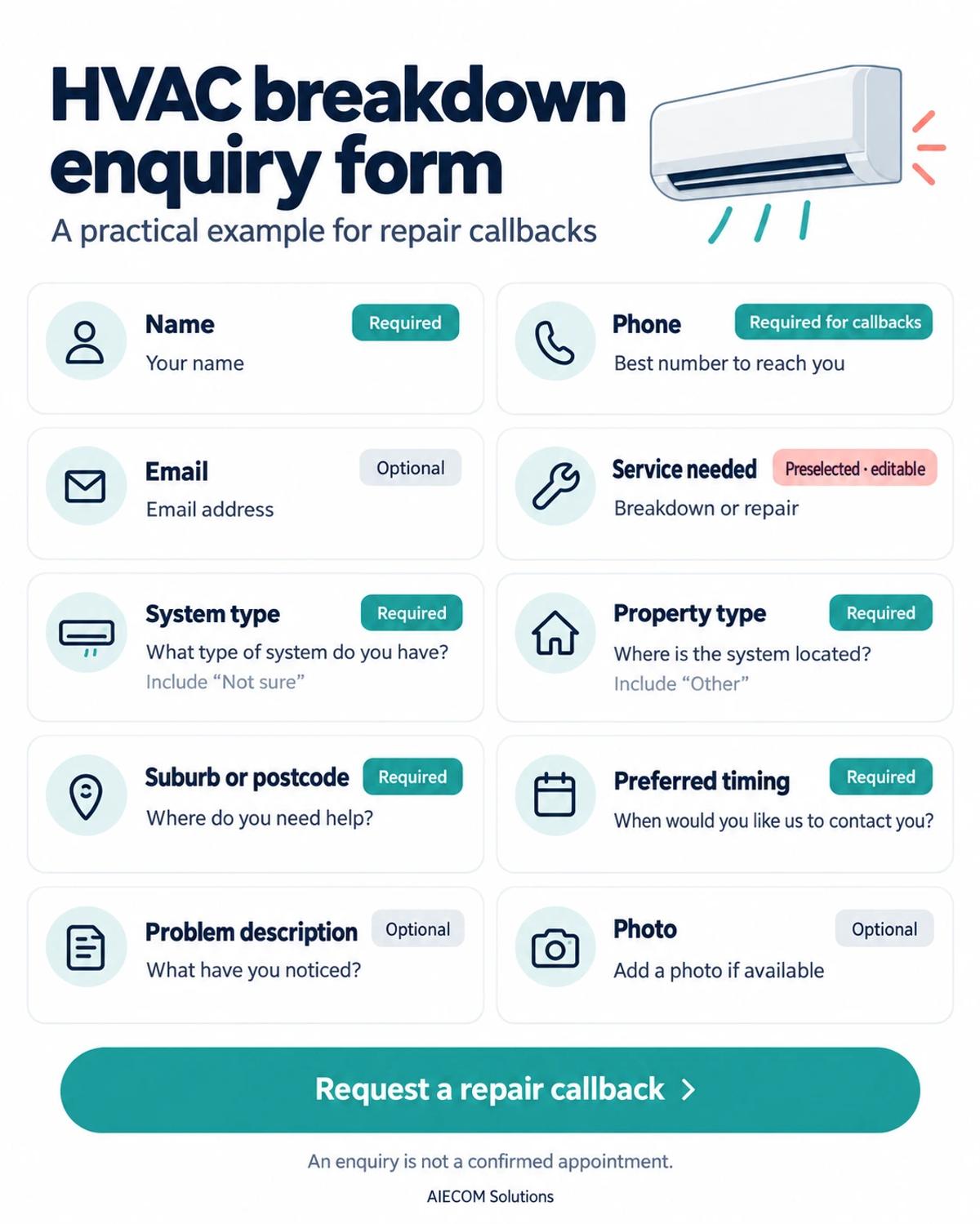
For the description, examples such as “not cooling”, “leaking water” or “unusual noise” help customers explain observations. They should not be asked to identify the cause.
Use a button such as “Request a repair callback” if that accurately describes what happens next.
Example installation or replacement form
An HVAC quote request form should establish project context without suggesting that every installation can be priced from a short submission.
Keep the contact, property and location fields, then add:
- Project: new installation, replacement or need advice.
- System preference: split, ducted, multiple systems or undecided.
- Preferred timing: a broad project timeframe.
- Project notes: an optional description of the spaces involved.
- Attachments: optional photos or plans, where useful.
Use “Request an installation quote” if your process begins a quote assessment. Explain that your team will confirm what further information or assessment is needed.
5. Make the form comfortable to use on a phone
A mobile form should be easy to understand and complete without awkward tapping, repeated typing or lost answers.
Treat the form as part of the wider website design and branding for HVAC businesses, including the page around it, the call option and the confirmation screen.
Use clear labels and manageable fields
A single-column layout is a practical starting point for a mobile form.
Keep labels visible above fields, mark optional questions and use suitable phone and email inputs. Give selection controls enough space to tap comfortably.
If something is missing, explain the problem beside the field and preserve the customer’s other answers. Test the form on a real phone, including any attachment steps.
Put click-to-call beside the form
A visible call option gives customers another way to contact the office when a conversation would be easier.
Show the correct phone number and actual phone-answering hours. Avoid “Call now for immediate service” unless that statement accurately reflects your operation.
The form should remain usable outside those hours, with clear expectations about when it is monitored.
6. Decide what happens after the customer submits
Every submission needs a clear acknowledgement, an assigned owner and an achievable response expectation.
Collecting useful information only helps if it reaches someone who can act on it. Define the handoff before adding more questions.
Confirm receipt without confirming a booking
The confirmation should explain what has happened and what remains to be arranged.
Suggested wording, to adapt to your actual process:
Thanks for your enquiry. We’ve received your details. Our team will contact you using the information provided to discuss the next step. Your appointment is not confirmed yet.
Add a response window only when your team can consistently meet it, and state whether it applies during office hours. If email is optional, do not promise an email acknowledgement to everyone.
Assign an owner and a backup
Each enquiry should have one person or team responsible for the next action.
A suggested workflow might route breakdown requests to service coordination, installation enquiries to estimating and maintenance agreement enquiries to a commercial contact. Smaller businesses may use one person for all three roles.
Plan for absences and seasonal peaks. Any lead capture and automated follow-up should reflect that ownership and be tested in the systems you actually use.
7. Keep privacy information clear and collection limited
Privacy-conscious form design starts with asking only for information needed to handle the enquiry.
Explain why you need contact and job details, and make your business’s privacy information easy to find. This is a design principle; your specific obligations need appropriate review.
Separate the enquiry from optional marketing
Submitting a repair request should not depend on agreeing to receive promotional emails.
If you offer marketing updates, present them as a separate, clearly worded choice. Have the wording and handling checked against the requirements that apply to your business.
For photo uploads, remind customers to avoid including people, documents or unrelated personal information. Review who can access submissions and how long the information needs to be kept.
8. Common mistakes to avoid
The most common design mistakes make customers do unnecessary work or create expectations the office cannot meet.
Watch for:
- Requiring every field: optional context becomes a barrier to submission.
- Removing “Not sure”: customers guess at system types or service categories.
- Using one long questionnaire: a split-system repair enquiry gets installation questions.
- Requesting the same information twice: selections must be repeated in the message box.
- Implying a confirmed visit: an enquiry receipt reads like a booking confirmation.
- Sending everything to an unowned inbox: nobody is clearly responsible.
- Hiding seasonal response changes: the website sets expectations the team cannot support.
Review what your office asks after receiving enquiries. Repeated questions may reveal a missing field, while unused answers may reveal one to remove.
9. What a good HVAC enquiry process looks like
A good process lets customers explain their need quickly and lets your office respond without rebuilding the enquiry from scratch.
Your team should be able to identify the service category, understand the broad system and property context, check the location and contact the customer. The customer should know their enquiry arrived and what happens next.
Test a breakdown, ducted replacement and commercial maintenance enquiry from submission through to follow-up. Check that conditional fields, notifications, ownership and confirmation wording all work as intended.
Ready to see where your HVAC lead flow is breaking down? request an HVAC growth audit with AIECOM Solutions.
10. Frequently asked questions
These answers cover the main decisions about what to ask on an HVAC website form.
How many fields should an HVAC enquiry form have?
Use as many fields as your team needs to take the next useful action, rather than aiming for a universal number. Start with name, a contact method, service needed, system type, property type, location and timing. Make additional notes optional, and show extra questions only when the selected service makes them relevant.
Should customers enter their full address?
Ask for the full address when it is needed for the next step, such as arranging an assessment or booking. For an initial conversation, a suburb or postcode may be enough to check coverage. If your office needs the street address upfront, explain why and avoid asking the customer to enter it again later.
Should an HVAC quote request form require photos?
Photos should usually be optional at the initial enquiry stage. They can provide context for an existing unit or proposed installation space, but they do not replace whatever assessment your business needs before quoting. Let customers submit without attachments, and avoid requests that require them to access equipment or expose unrelated personal information.
Can the form provide an instant installation quote?
Only present an instant price when you have a verified quoting process that accounts for the relevant scope and clearly explains its limits. Otherwise, use the form to start an assessment. For split-system or ducted work, explain whether the next step is a phone discussion, additional information or a site visit, according to your actual process.
NEXT STEP
Ready to Work With a Team That Actually Delivers?
Book a free strategy call. No pitch. Just honest advice.